Here I am explaining how to create PDF Viewer in asp.net.
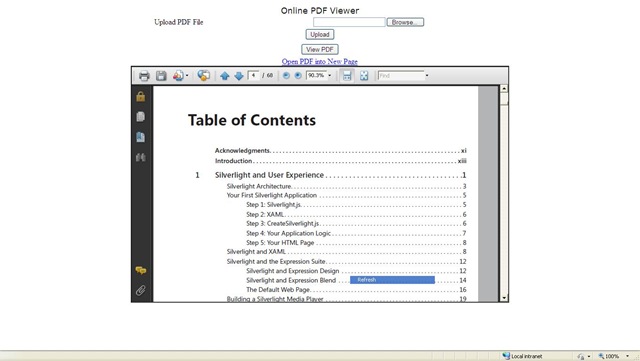
Steps:
1) create Class Library Project Here I am give name OnlinePdfViewer. Here I am using c#.net. Write below code in to file.
using System;
using System.Collections.Generic;
using System.ComponentModel;
using System.Text;
using System.Web;
using System.Web.UI;
using System.Web.UI.WebControls;

namespace OnlinePdfViewer
{
    public class DisplayPdf : WebControl
    {
        private string _filepath;
        public string FilePath
        {
            get
            {
                return _filepath;
            }
            set
            {
                if (string.IsNullOrEmpty(value))
                {
                    _filepath = string.Empty;
                }
                else
                {
                    int tild = -1;
                    //check ~ symbol including in pdf path then remove
                    tild = value.IndexOf('~');
                    if (tild != -1)
                    {
                        _filepath = value.Substring((tild + 2)).Trim();
                    }
                    else
                    {
                        _filepath = value;
                    }
                }
            }
        }

        protected override void RenderContents(HtmlTextWriter writer)
        {
            try
            {
                StringBuilder sb = new StringBuilder();
                sb.Append("<iframe src=" + Convert.ToString(FilePath) + " ");
                //fix height and width
                sb.Append("width=800px height=500px");
                sb.Append("<View PDF: <a href=" + Convert.ToString(FilePath) + "</a></p> ");
                sb.Append("</iframe>");
                writer.RenderBeginTag(HtmlTextWriterTag.Div);
                writer.Write(Convert.ToString(sb));
                writer.RenderEndTag();
            }
            catch
            {
                //If any problem in the PDF at that time display below information
                writer.RenderBeginTag(HtmlTextWriterTag.Div);
                writer.Write("PDF Control...");
                writer.RenderEndTag();
            }
        }
    }
}
2) Run the project it generate dll –> OnlinePdfViewer.dll.
3) Create New Web Application give name – DemoPDFViewer.I have create application in asp.net with c#.
Here I have create demo application In application User can upload PDF and View uploaded PDF in PDF viewer.
3.1) Add the Reference of OnlinePdfViewer.dll into Site.
3.2) Make PDF folder into Site.
3.3) Upload PDF Functionality
ASPX Code :
<%@ Page Language="C#" AutoEventWireup="true" CodeFile="Default.aspx.cs" Inherits="_Default" %>

<%@ Register Assembly="OnlinePdfViewer" Namespace="OnlinePdfViewer" TagPrefix="PdfViewer" %>
<!DOCTYPE html PUBLIC "-//W3C//DTD XHTML 1.0 Transitional//EN" "http://www.w3.org/TR/xhtml1/DTD/xhtml1-transitional.dtd">
<html xmlns="http://www.w3.org/1999/xhtml">
<head runat="server">
    <title>PDF View Online</title>
</head>
<body>
    <form id="form1" runat="server">
    <div>
        <center>
            <table>
                <tr>
                    <td colspan="2" align="center" style="font-family: Verdana; font-size: larger">
                        Online PDF Viewer
                    </td>
                </tr>
                <tr>
                    <td>
                        Upload PDF File
                    </td>
                    <td>
                        <asp:FileUpload ID="fup" runat="server" />
                    </td>
                </tr>
                <tr>
                    <td colspan="2">
                        <asp:Button ID="btnUpload" runat="server" Text="Upload" OnClick="btnUpload_Click" />
                    </td>
                </tr>
                <tr>
                    <td>
                        <asp:Label ID="lblMsg" runat="server" ViewStateMode="Disabled" Font-Bold="true" ForeColor="Red"></asp:Label>
                    </td>
                </tr>
                <tr>
                    <td colspan="2" align="center">
                        <asp:Button ID="btnView" Text="View PDF" runat="server" Visible="false" OnClick="btnView_Click" />
                    </td>
                </tr>
                <tr>
                    <td colspan="2" id="pnlPDFViewer" visible="false" runat="server">
                        <asp:HyperLink ID="HyperLink1" runat="server">Open PDF into New Page</asp:HyperLink>
                        <br />
                        <PdfViewer:DisplayPdf ID="displaypdf1" runat="server" BorderStyle="Inset" BorderWidth="2px"
                            Style="height: 500px;" Width="800px" />
                    </td>
                </tr>
            </table>
        </center>
    </div>
    </form>
</body>
</html>
CS Code:
using System;
using System.Data;
using System.Configuration;
using System.Web;
using System.Web.Security;
using System.Web.UI;
using System.Web.UI.WebControls;
using System.Web.UI.WebControls.WebParts;
using System.Web.UI.HtmlControls;
using System.Drawing;

public partial class _Default : System.Web.UI.Page
{
    protected void Page_Load(object sender, EventArgs e)
    {

    }

    public string Uploadedfilename { get { return Convert.ToString(ViewState["filename"]); } set { ViewState["filename"] = value; } }

    protected void btnUpload_Click(object sender, EventArgs e)
    {
        if (fup.HasFile)
        {
            string strFilePath = Server.MapPath("PDF") + "\\";
            Uploadedfilename = Convert.ToString(Guid.NewGuid()) + ".pdf";
            strFilePath = strFilePath + Uploadedfilename;
            fup.SaveAs(strFilePath);
            lblMsg.ForeColor = Color.Blue;
            lblMsg.Text = "PDF File Upload Successfully";
            btnView.Visible = true;
        }
        else
        {
            lblMsg.Text = "Please Upload PDF File";
        }
    }
    protected void btnView_Click(object sender, EventArgs e)
    {
        pnlPDFViewer.Visible = true;
        displaypdf1.FilePath = @"~/pdf/" + Uploadedfilename;
        HyperLink1.NavigateUrl = @"~/pdf/" + Uploadedfilename;
    }
}
4) compile code and run application.
thnx


Leave a Reply