First of first how to open windows registry editor ?
Open Run Menu (Windows + R) and type regedit the below screen is open.
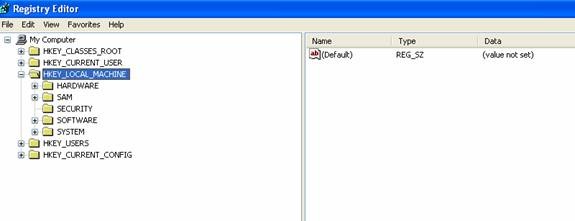
(Figure 1)
here I am created the simple application using windows C#.net 2.0.
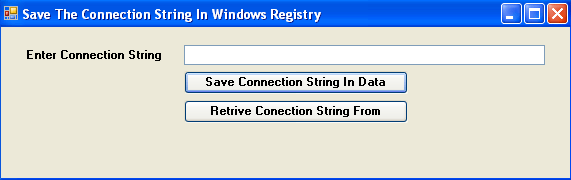
steps:
1) Create Simple Windows Application using C#. add the namespace
using Microsoft.Win32;
2) put the below control on the form.
| Control | Control Id | Control Value |
| label | label1 | Enter Connection String |
| label | lblGetConnectionString | |
| TextBox | txtConnectionString | |
| Button | btnSaveConnectionStringInDB | Save Connection String In Data |
| Button | btnRetriveConnectionStringFromRegistry | Retrive Connection String From Windows Registry |
3) in the Figure 1 Local Machine Contain Five Key
1) Hardware 2) Sam 3) Security 4) Software 5) System.
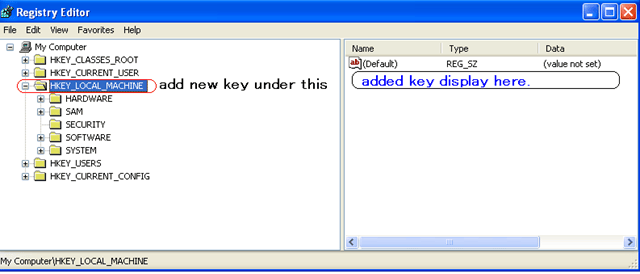
in the figure 1 only one key is display. now we code and then new key is added under the
HKEY_LOCAL_MACHINE. in below screen the brief idea is given.
4) Now Put the Below code in to .CS File.
4.1) Declare the global variable
//configuration data for the local machine
   //Windows registry base key HKEY_LOCAL_MACHINE
   RegistryKey objRegistryKey = Registry.LocalMachine;
4.2) on the button click (btnSaveConnectionStringInDB) put below code.
private void btnSaveConnectionStringInDB_Click(object sender, EventArgs e)
   {
     try
     {
       //now set the new key under the base key
       //argument 1) Name Of The Key (MyConnectionString)
       //         2) Key (TextBox Enter Value)
       //         3) value type (string)
       //now i am use hardcoded key value
       objRegistryKey.SetValue("MyConnectionString", txtConnectionString.Text, RegistryValueKind.String);
       MessageBox.Show("Key Is Sucessfully Registered");
     }
     catch (Exception ex)
     {
       MessageBox.Show("Can Not Store Data In Registry" + ex.Message.ToString());
     }
   }
4.3) on the button click (btnRetriveConnectionStringFromRegistry) put below code.
private void btnRetriveConnectionStringFromRegistry_Click(object sender, EventArgs e)
{
  string values = (string)objRegistryKey.GetValue("MyConnectionString");
  //display the connection string value in the label
  lblGetConnectionString.Text = values;
}
5) Add Key In to Windows Registry.
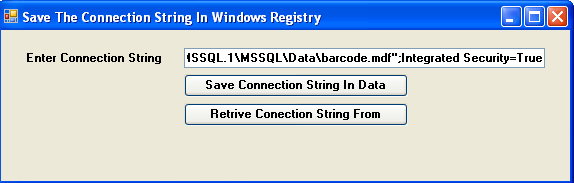
After the get message open the windows registry.
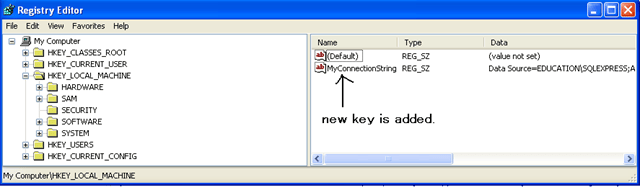
entered key is added successfully please check the figure1 and last this figure.
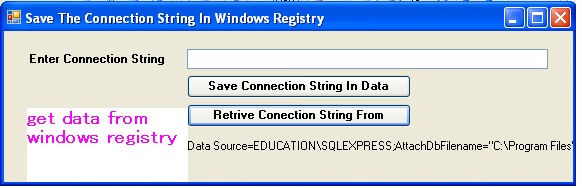
6) Get the Value from the RegistryKey (MyConnectionString)
Thnx


Leave a Reply